

Rubber Duck Debugging Meets Tactile Fidgeting: Keeping a Yellow Duck Squishy by Your Monitor
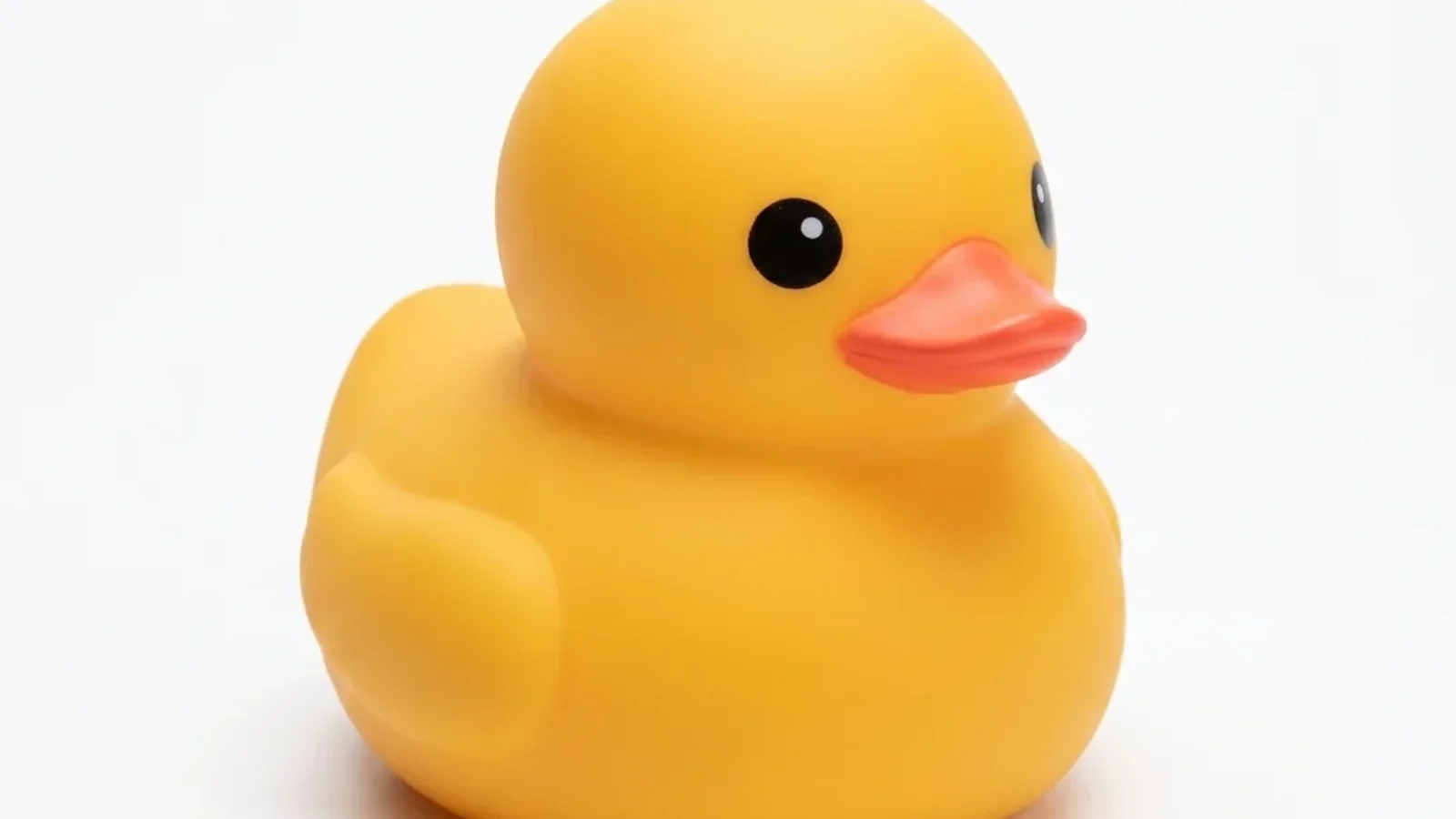
Illustration based on studio photography of the Plump Yellow Duck Squishy.
When software developers stare at a stubborn logic bug, the hardest part is rarely the syntax. Most coding hurdles come down to faulty assumptions hidden inside complex branching statements or asynchronous state updates. For decades, software engineers have relied on rubber duck debugging to untangle knotty problems. By explaining code line by line to an inanimate yellow duck perched near the monitor, programmers force their minds to slow down, verbalize assumptions, and spot errors they skimmed past while reading in silence.
Yet traditional hollow plastic bath ducks are rigid and static. They serve as quiet listeners, but they offer zero tactile relief when compiler errors pile up or test suites fail unexpectedly. Pairing that time-tested programming tradition with a modern coding desk buddy made of soft, compressible foam transforms passive listening into an active sensory anchor. A tactile squishy gives your hands a quiet, repetitive physical outlet while your mind steps through logic gates.
On Squishyuy, three distinct desk companions highlight different physical solutions for technical workstations. The upright Plump Yellow Duck Squishy (SQ-10 / SQ-010, $14.99) honors classic debugging folklore with a stable sitting posture and matte finish. For low-clearance shelves, the horizontal Creamy Butter Stick Squishy (SQ-008, $12.99) slides neatly under monitor risers to preserve valuable screen clearance. Meanwhile, the grounded Glitter Capybara Squishy (SQ-012, $14.99) brings amber gel clarity to late-night coding sessions. Choosing the right companion depends on how you arrange your screens, cables, and keyboard workspace.
The Sounding Board by Your Screen: How Rubber Duck Debugging Clarifies Complex Code
The concept of rubber duck debugging originated in the software engineering classic The Pragmatic Programmer, published in 1999. In that narrative, an expert programmer carried a small yellow duck and forced colleagues to explain their code to the duck before asking for human assistance. That psychological habit remains practical today. When you read code on a screen, your brain takes shortcuts by assuming variables contain what you intend rather than what the compiler actually sees. Speaking the logic out loud breaks that cognitive loop.
In developer communities like the r/softwaredevelopment forum on Reddit, programmers regularly discuss why talking to desk companions helps resolve thorny problems. One contributor explained that most bugs are not about syntax but about thinking, noting that vocalizing the problem out loud is one of the most effective ways to untangle difficult software issues. Another community member shared that they keep a small animal figurine by their keyboard for the exact same purpose, finding that an external listener helps organize thoughts during solitary focus hours.
Introducing a soft rubber duck squishy elevates this practice. During prolonged compile pauses or deployment checks, nervous hand energy often manifests as desk drumming, pen clicking, or restless mouse gripping. Squeezing a dense foam companion channels that physical tension into a silent, rhythmic motion that will not register on open microphone calls or distract coworkers in open-plan offices.
Upright Mascot vs Horizontal Bar: Choosing a Silhouette for Your Coding Setup
Workstations built around multi-monitor arms and mechanical keyboards have limited free surface area. Placing an accessory where it interferes with mouse sweeps or blocks screen pixels creates physical friction. Finding the right desk companion involves evaluating three geometric profiles:
- Upright sitting silhouettes: An upright figure lifts its head and facial features into your natural eye line. When placed slightly behind the keyboard or next to the monitor bezel, the companion faces you directly, making it an engaging visual sounding board for verbal debugging.
- Horizontal resting bars: A flat rectangular shape lies parallel to the desk mat. With minimal vertical height, horizontal items tuck under monitor shelves, sit beneath lower display bezels, or rest directly above function keys without blocking screen corners.
- Compact gel loafers: A low-slung loaf posture cast from solid translucent gel offers high stability and a dense, weighty tactile resistance. Its rounded profile fits into cupped palms for discreet lap-level squeezing during video meetings.
Each shape accommodates distinct desk habits, typing postures, and peripheral setups.
Plump Yellow Duck Squishy: Screen-Side Companionship and Silent Palm Compression
The Plump Yellow Duck Squishy ($14.99) is designed specifically for screen-side placement. Cataloged in the gifts collection with SKU SQ-10, this figurine features a chubby pastel-yellow sitting body, bright orange bill, tiny sculpted wings, and molded webbed feet. Its matte surface finish feels velvety under the fingertips and avoids reflecting bright monitor glare.
Key design attributes for coding setups include:
- Stable tripod resting base: The duck rests firmly on its plump belly and molded feet, preventing it from tipping over when you tap its head or pick it up between coding sprints.
- Soundless compression recovery: Squeezing the duck full-palm yields smooth tactile resistance without the loud clicks or rattles common to plastic fidget switches.
- Direct eye contact posture: Standing upright beside your primary monitor, the duck maintains an attentive posture that makes verbalizing logic feel intuitive and natural.
The Plump Yellow Duck Squishy is priced at $14.99 in the official store catalog and is sold individually as a novelty non-food toy.
Creamy Butter Stick Squishy: Flat Low-Profile Resting Under Monitor Risers
If your setup features shallow monitor shelves or dual displays positioned low against the desk surface, the Creamy Butter Stick Squishy ($12.99) offers an ultra-low vertical profile. Listed in the bakery collection under SKU SQ-008, this rectangular butter bar features a pale-yellow body wrapped in a partially folded blue-and-white wrapper design.
Spatial and tactile characteristics include:
- Zero vertical screen obstruction: Because the butter stick rests horizontally on its flat bottom, you can place it directly below your monitor bezel without obscuring taskbars, terminal outputs, or system trays.
- Two-handed rolling motion: The elongated rectangular geometry allows gentle two-handed rolling across a desk mat, helping stretch fingers and wrists between heavy typing sessions.
- Clean peripheral framing: Its flat lines align cleanly with keyboard wrist rests and rectangular mouse mats, creating an orderly, minimalist desk aesthetic.
The Creamy Butter Stick Squishy is cataloged at $12.99 and provides an understated, humorous bakery accent for developers who prefer horizontal desk geometry.
Glitter Capybara Squishy: Amber Gel Presence for Calm Long-Session Focus
For late-night debugging marathons where screen brightness dominates a dark room, the Glitter Capybara Squishy ($14.99) delivers a tranquil visual presence. Cataloged under gifts with SKU SQ-012, this figurine captures the famously unflappable capybara in a grounded loaf posture, cast from translucent golden-amber gel infused with fine holographic glitter flakes.
Distinct benefits for technical desks include:
- Light-catching amber aesthetic: Translucent golden gel catches ambient monitor light and task illumination, creating a warm, glowing mascot on your desk pad.
- Dense gel resistance: Unlike airy polyurethane foam, translucent gel provides a firmer, slower rebound that engages hand muscles during deep conceptual planning.
- Calm grounded posture: The capybara sits with dark paws tucked and rounded facial features, projecting a steady, unbothered attitude during stressful production outages.
The Glitter Capybara Squishy retails for $14.99 in the official catalog and serves as a durable, quiet focus companion for long development sprints.
Coding Desk Buddy Silhouette, Tactile Response, and Catalog Pricing Comparison
Comparing desk companions side by side highlights how footprint shape, vertical presence, and material texture serve different workstation needs.
| Product & SKU | Store Catalog Price | Silhouette & Base Geometry | Tactile Material & Finish | Primary Workspace Placement | Debugging & Fidgeting Function | Catalog Specification Boundaries |
|---|---|---|---|---|---|---|
| Plump Yellow Duck Squishy (SQ-10 / SQ-010) | $14.99 | Upright sitting duck with stable tripod base | Matte pastel-yellow foam with orange bill | Beside primary monitor bezel or keyboard | Audible sounding board for rubber duck debugging and silent palm squeeze | Millimeter dimensions, gram weights, and rebound timings remain unmeasured nulls |
| Creamy Butter Stick Squishy (SQ-008) | $12.99 | Horizontal rectangular bar in folded wrapper | Smooth pale-yellow foam with wrapper texture | Under monitor riser or above function keys | Low-clearance horizontal resting and two-handed wrist-stretch rolling | Millimeter dimensions, gram weights, and rebound timings remain unmeasured nulls |
| Glitter Capybara Squishy (SQ-012) | $14.99 | Grounded teardrop loaf with low center of gravity | Translucent golden-amber gel with holographic glitter | Desk corner or cupped in palm under desk | Firm gel resistance and calming screen-side mascot presence | Millimeter dimensions, gram weights, and rebound timings remain unmeasured nulls |
Workstation Setup Guidelines, Surface Care, and Catalog Specification Boundaries
Integrating a desk companion into an active coding setup requires balancing peripheral clearance with everyday desk maintenance:
Workspace Ergonomics and Cable Management
Desk space around mechanical keyboards and mousepads fills quickly. Keep mouse sweep paths clear by setting your squishy on the non-dominant side of the keyboard or directly under the central display mount. Avoid routing coiled aviator cables or USB-C charging leads over your desktop figures, as tugging on cables during keyboard adjustments can tip upright figurines onto keycaps.
Surface Cleaning by Material
Computer fans circulate dust continuously across developer desks, making regular cleaning helpful:
- Translucent gel maintenance: Dust adhering to the Glitter Capybara rinses clean under lukewarm tap water. After washing, dry the surface thoroughly with a lint-free cloth and dust lightly with cornstarch so the gel retains a pleasant, non-tacky finish.
- Polyurethane foam maintenance: Because the Plump Yellow Duck and Creamy Butter Stick use open-cell foam bodies, never dunk or submerge them in liquid. A soft, dry microfiber cloth removes surface dust safely without altering foam texture.
Catalog Records and Specification Boundaries
Squishyuy provides explicit catalog documentation for every listed item. For the Plump Yellow Duck Squishy (SQ-10 / SQ-010, $14.99), Creamy Butter Stick Squishy (SQ-008, $12.99), and Glitter Capybara Squishy (SQ-012, $14.99), store records preserve null placeholders for physical millimeter dimensions, gram weights, and rebound timings in seconds.
Because these items are designed purely as novelty non-food desk companions, the database stores these numeric attributes as unmeasured null fields. These products are sold individually for desktop amusement and focus. They are never marketed as orthopedic rehabilitation tools, clinical medical therapies, or waterborne bath toys.
Frequently Asked Questions
Why use a squishy duck instead of a traditional plastic rubber duck for coding?
A traditional hollow bath duck is rigid and makes a clattering sound if knocked against a hard tabletop. A foam duck squishy provides an identical classic visual presence for rubber duck debugging while delivering silent, palm-conforming tactile squeeze relief during compile waits.
Where should a coding desk buddy sit to avoid interfering with mouse movement?
Place your coding desk buddy on the non-dominant side of your keyboard, on a monitor riser shelf, or directly beneath the display bezel. Keeping it outside your primary mouse-sweep arc ensures your hands move freely without accidental collisions.
What is the official catalog price for each coding desk buddy?
In the official Squishyuy catalog, the Plump Yellow Duck Squishy (SQ-10 / SQ-010) is $14.99, the Creamy Butter Stick Squishy (SQ-008) is $12.99, and the Glitter Capybara Squishy (SQ-012) is $14.99. All items are sold individually as novelty non-food toys.
Can the Creamy Butter Stick squishy fit under a shallow monitor riser?
Yes. The Creamy Butter Stick Squishy rests as a flat horizontal bar, giving it minimal vertical profile compared to upright figurines. It slides cleanly into shallow clearance gaps under laptop stands and monitor shelves.